Smart Money: how to track large trades and whales
In short
- The screen shows large Polymarket trades in real time and which markets big money is entering, and on which side.
- The Whale, Smart, MM and New tags explain who is behind a trade.
- A large bet is a pattern, not proof. Compare the trade price with the current one and check the market.
The Smart Money screen shows large Polymarket trades in real time: who bought what, and at what price, right now. Alongside it you get money flow by market, holder concentration, young wallets with big bets, the trader rating and the markets where smart money disagrees with the price. It helps you see where large participants are betting. You will find it under Smart Money.
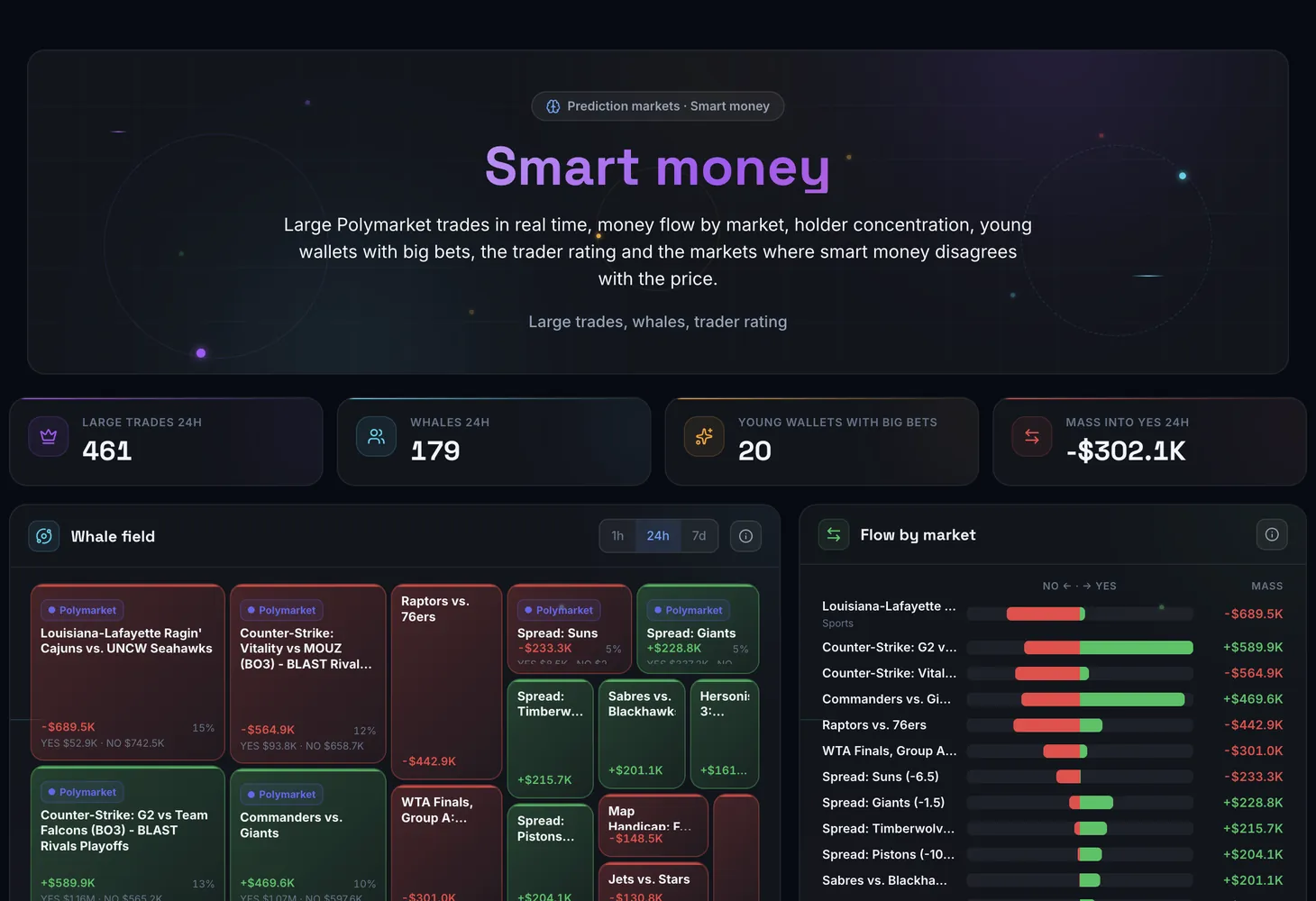
How the screen is organized
Four figures sit at the top: Large trades 24h, Whales 24h, Young wallets with big bets and Mass into YES 24h. Below them are seven blocks.
| Block | What it shows |
|---|---|
| Whale field | Market tiles by large-money flow over the period. Tile size is the money mass, colour is the direction, YES or NO, and saturation is the strength of the imbalance. A click on a tile keeps that market's trades in the feed |
| Flow by market | The mass of large taker trades by market: NO to the left, YES to the right, for an hour, a day and a week |
| Large trades | The trade feed: trades from $1,000, smart wallets' trades from $100 and every trade by wallets you follow |
| Concentration | Markets where one wallet holds more than half of one side with open interest of $100,000 and more: the share, the top 10, the wallet and its amount |
| Young wallets with big bets | Buys of $5,000 and more at 95¢ or less by wallets younger than 14 days: the wallet's age at the trade, market, side, price and amount |
| Trader rating | Polymarket traders by PnL over a week, a month or all time |
| Smart money against the market | Markets where the smart wallets' share on YES diverges from the market price |
Mass is the imbalance of large bets toward one side, YES or NO.
Columns of the Large trades feed
| Column | What it shows |
|---|---|
| Time | When the trade happened |
| Trader | The wallet or trader name with tags |
| Market | The question and the outcome the bet is on |
| Side | Buy or sell |
| Price | The trade price |
| Amount | The trade size in dollars |
| Role | Taker or maker |
| Position | What the trade did to the position: Opened, Added, Reduced or Closed |
A row also flags a young wallet and a trader's first trade in that market. While a trade's role is unknown, the row is dimmed and not counted in volumes.
Wallet tags
| Tag | Who gets it |
|---|---|
| Whale | A position of $100,000 and more or a trade of $50,000 and more in 30 days |
| Smart | 20 or more settled positions, a win rate of 60% and up, ROI of 15% and up, profit of $50,000 and more, not a market maker |
| MM | A market maker: maker rebates of $1,000 and more with PnL under 2% of turnover |
| New | An account younger than 14 days |
The trader rating and Smart money against the market
For each trader the rating lists PnL, ROI, Win rate on settled positions, Turnover, Avg trade, Focus, a Score from 0 to 100, the number of open positions and the last trade. Market makers are hidden by default.
The score helps tell steadily profitable traders from those who got lucky once. It combines the win rate, adjusted for the number of positions, with ROI and profit.
The Smart money against the market block puts two scales side by side, YES price and Smart money for YES, along with the Gap between them, the number of wallets and the amount. For example, if smart wallets stand at 80% on YES while the market says 55¢, one of the two is wrong.
Filters and buttons
- The "Market, trader, address…" search: find trades by market, name or wallet address.
- Tags: keep trades by wallets with the chosen tags.
- Takers only: drop maker trades and see only those who took a price from the book themselves.
- Periods: 15 min, 1 hour, 24 hours and 7 days.
- A click on a whale field tile: keep one market's trades in the feed.
- A click on a market or a name: open the market page or the trader page.
What to look for
- A big bright tile on the whale field: a strong one-sided flow of money. Many small tiles mean money is scattered.
- An imbalance growing from the hour to the day: steady interest. An imbalance against the price move means large participants are betting against the crowd.
- A series of buys in one market by one trader: they are building a position.
- One wallet's share above 70%: that side's price is not a market price, and the holder's exit would crash it.
- Several new wallets in one market, or a bet on an unpopular outcome: a market worth watching.
- A big gap with several smart wallets: the price may catch up. A gap with a single wallet is noise.
How to use it
Pick a period
Fifteen minutes or an hour is enough for fast moves; a day or a week gives the bigger picture.
Find a market on the whale field
A big bright tile shows where money is going and on which side. Click it to see that market's trades.
See who is trading
In the feed, look at the tags, the role and the Position column: Opened and Added are entries, Reduced and Closed are exits.
Check the market
Look at Concentration and Smart money against the market, then open the market page with all its holders.
Study the trader
A click on a name opens the trader page. Add the traders whose trades you want to keep seeing to your follows in Copy-trading.
Plans
If the screen asks you to sign in instead of showing data, sign in. If a block says it is available on the Lite and Pro plans, the See plans button takes you to Pricing.
Related guides: Analytics and Copy-trading. The theory is in the course on prediction market arbitrage, and the terms are in the glossary: maker and taker, open interest.
Questions and answers
What is smart money on prediction markets?
It is a name for wallets with a consistent track record. On this screen the Smart tag goes to a wallet with 20 or more settled positions, a win rate of 60% and up, ROI of 15% and up and profit of $50,000 and more that is not a market maker.
Who counts as a whale?
A wallet with a position of $100,000 and more or a trade of $50,000 and more in the last 30 days.
How does a taker differ from a maker?
A maker places an order in the book and waits; a taker fills someone else's order right away. A taker trade says more about intent: the person was ready to pay the current price. That is why the flows count taker trades.
Should I repeat a whale's trade?
That is your decision. First compare the trade price with the current one, look at the trader's rating and history, and check holder concentration. A single large wallet can move a market for reasons of its own.