Fair – Last: how to read the table of mark price versus last trade divergence
In short
- Each row is a coin's futures on one exchange, with its Fair Price (mark price), Last Price (last trade) and the spread between them in percent.
- The Last 5s–60s and Fair 5s–60s columns show which price is moving and whether the gap is widening.
- A divergence is a signal to examine, not a ready trade. The price may not return to Fair, and an entry carries the usual futures risks.
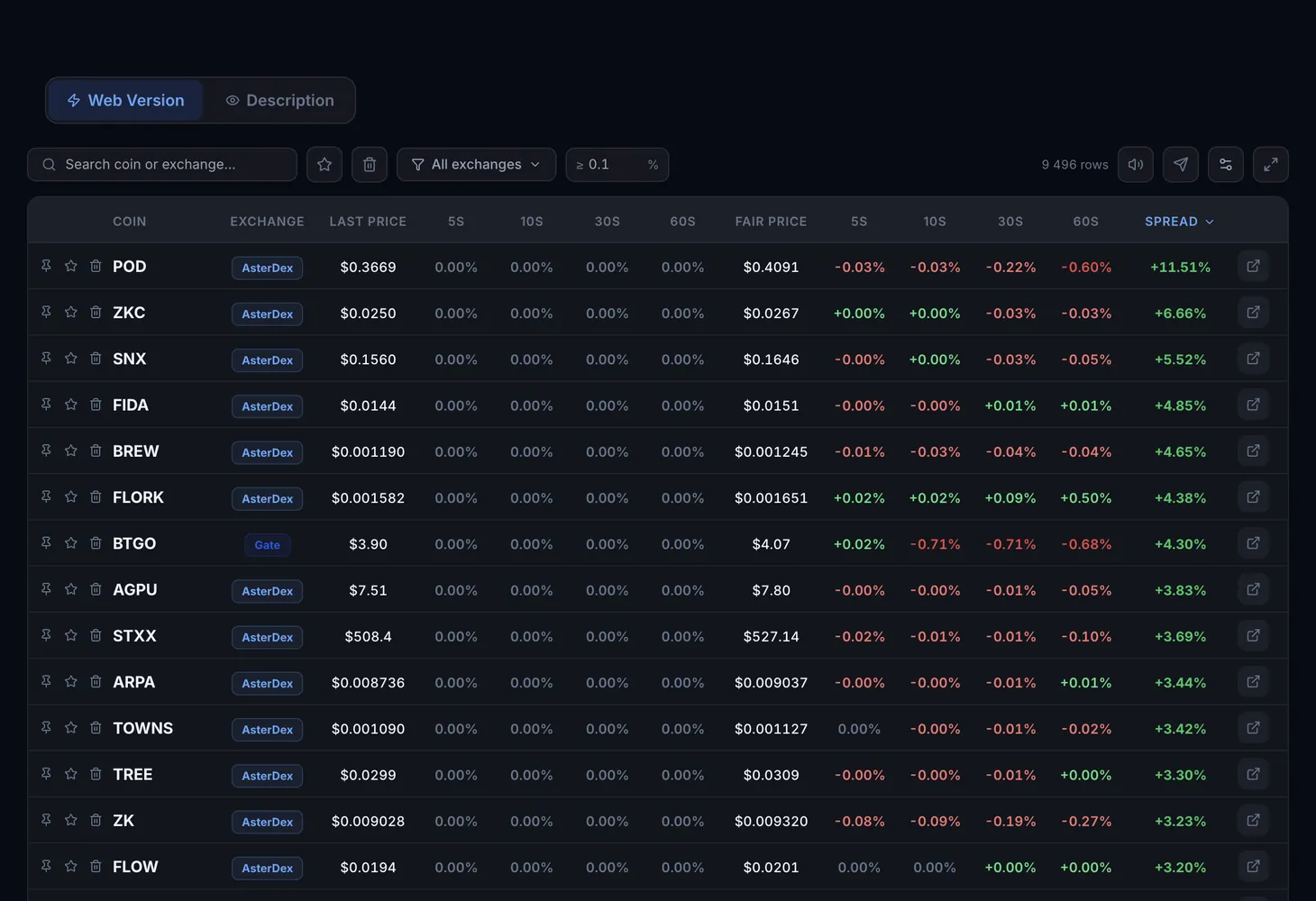
The Fair – Last table shows how far the last trade price (Last) on an exchange's futures market has moved away from the mark price (Fair). For each coin you see both prices, the spread between them and how each changed over the last few seconds. This reveals where trades pushed the price sharply or where the order book ran thin. The table is on the Web version tab of Fair – Last.
Fair and Last: what is the difference
The mark price (Fair Price) is a calculated price the exchange derives from an index of several sources. Liquidations are based on it. Last Price is the price of the most recent trade on that exchange.
The two usually move together. Aggressive buying or selling shifts Last, while Fair stays tied to the index. A gap also appears in thin markets, where even a small trade moves the last trade price noticeably.
- Positive spread — Fair is above Last: the last trade printed below the calculated price.
- Negative spread — Fair is below Last: the last trade printed above the calculated price.
Table columns
| Column | What it shows |
|---|---|
| Pin, favorites, trash | Buttons on the left: pin the row to the top, star it or move it to the trash |
| Coin | The futures ticker |
| Exchange | The exchange where the divergence was found |
| Last Price | The last trade price |
| Last 5s, 10s, 30s, 60s | Change in Last Price over 5, 10, 30 and 60 seconds |
| Fair Price | The exchange's mark price |
| Fair 5s, 10s, 30s, 60s | Change in Fair Price over the same intervals |
| Spread | Deviation of Fair from Last in percent |
The button at the end of the row opens the exchange's futures terminal for that coin. You can sort by any column, and in the Table settings window you can hide columns and change their order. Coin, Exchange and Spread cannot be hidden.
Filters and buttons
- Search coin or exchange — find a row by ticker or exchange name.
- All exchanges — pick one or more exchanges. Clear removes the selection.
- Minimum spread — drop rows with a small divergence.
- Favorites and Trash — show only starred rows or the ones you removed.
- Show more — load more rows. The row count of the current selection is shown above the table.
- On the right are sound alerts, Telegram alerts and fullscreen mode. Telegram alerts cover spreads above 5%.
How to examine a signal
Filter out the noise
Set a minimum spread. Gaps below 1–2% are usually ordinary market noise.
See which price is moving
Compare the Last and Fair columns. If Last jumped within 5 seconds while Fair barely moved, it is a trade-driven impulse with no move in the index.
Read the change across intervals
If the gap grows from 5s to 60s, the situation is building. If it is already shrinking, the moment has most likely passed.
Compare with other exchanges
Search for the same coin. If the gap exists on only one exchange while prices move together elsewhere, the situation is local to that venue.
Make your own decision
Use the button at the end of the row to open the exchange terminal and check the order book. Position size, stop and exit are your decision and your risk.
How Fair – Last differs from CEX Pumps – Dumps
CEX Pumps – Dumps tracks how one price changes over time: how much a coin has risen or fallen. Fair – Last compares two prices at one moment: how far the last trade is from the mark price. The two tools complement each other.
For how perpetual contracts work, see the glossary: perpetual futures and basis. The basics are in the Futures arbitrage course.
Questions and answers
What are Fair Price and Last Price?
Fair Price is the mark price: the exchange calculates it from an index of several sources and uses it for liquidations. Last Price is the price of the most recent trade on the exchange.
What spread counts as significant?
Gaps below 1–2% are usually market noise. Telegram alerts are sent for spreads above 5%, while the table shows every value.
Is the tool suitable for beginners?
Yes. The table shows ready spreads and links to exchanges, and the steps above explain how to examine a signal. Leveraged futures trading still requires understanding the risks.
Do I need a plan?
No, the Fair – Last table is available in free mode. Plan details are on the Pricing page.