How to use funding arbitrage: rates, spreads and history
In short
- The table compares funding rates for the same coin across exchanges and shows the spread between them, normalized to 8 hours.
- The setup is a Short on the exchange with the high rate and a Long on the one with the low rate. The payment gap is what you collect.
- Rates change before settlement and the price gap affects your entry. The strategy carries its own risks.
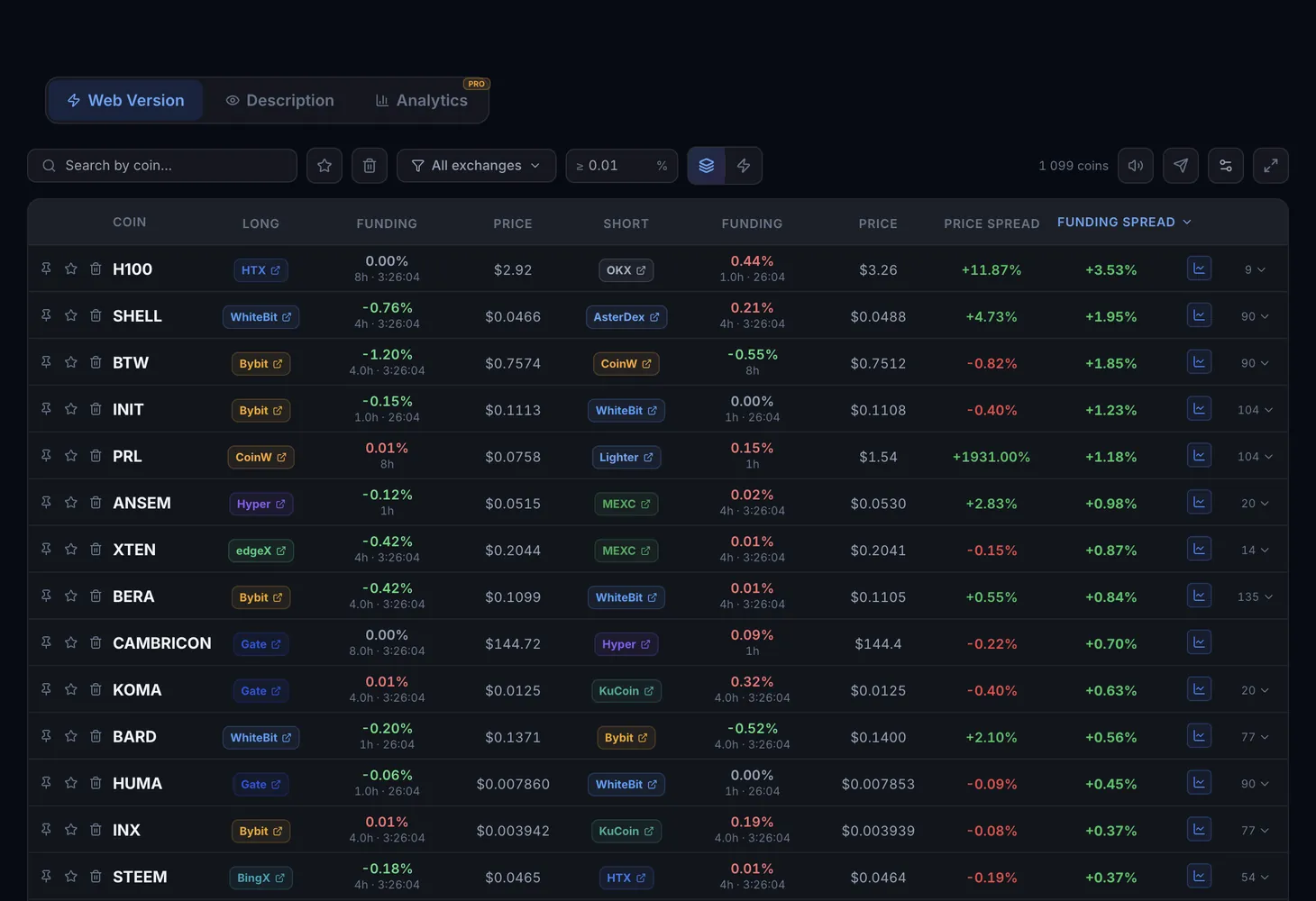
Funding arbitrage compares funding rates for the same coin across exchanges. The table shows where to open the Long, where to open the Short, what each side pays, when the next settlement is and what the spread between the rates is. The tool is on the Web Version tab of Funding Arbitrage.
How funding works
Funding is a regular payment between holders of perpetual futures. With a positive rate, longs pay shorts; with a negative rate, it is the other way round. If one exchange has a higher rate than another, you can open opposite positions and collect the difference in payments.
Exchanges settle funding on different schedules: every 4, 8 or 24 hours. To make the rates comparable, the spread in the table is normalized to 8 hours. For example, a rate of 0.01% per 4 hours equals 0.02% per 8 hours.
Table columns
| Column | What it shows |
|---|---|
| Coin | The ticker, with Pin, Favorite and Hide buttons next to it |
| Long → Short | The exchanges where each position is opened |
| Funding | The current rate on the exchange |
| Period | How often the exchange settles funding |
| Time | When the next settlement happens (UTC+0) |
| Funding Spread | The rate gap between the exchanges, normalized to 8 hours |
| Price | The futures price on each exchange. Available with Lite or Pro |
| Price Spread | The price gap between the two exchanges. Available with Lite or Pro |
| Link | Opens the exchange's futures terminal |
The Details button expands every exchange for the coin, and Open funding chart shows the spread chart for the chosen exchange pair.
Modes, filters and buttons
- All exchanges (live): every coin on every exchange, with rates, periods, prices and the spread across all exchange pairs.
- Bot signals: only the best exchange pair per coin, the one with the widest funding spread.
- Search by coin...: search by ticker.
- Exchanges: choose exchanges; Clear brings back all of them.
- Settlement interval: 4, 8 or 24 hours.
- Minimum spread: the threshold below which rows are hidden.
- Favorites and Trash: marked and hidden coins.
Above the table you will find the number of coins in the selection, Table settings and full screen mode. Spread alerts come through Telegram.
How to use it
Find a rate gap
Switch to Bot signals and sort by spread. The coins with the widest rate gap between exchanges come to the top.
Check the period and time
Compare the Period and Time columns for both exchanges. The position has to be open before the next settlement, or you will not receive the payment.
Compare prices
On Lite or Pro, look at Price and Price Spread. If the price on the Short exchange is noticeably lower than on the Long exchange, the entry starts you off in the red.
Open the positions
Short on the exchange with the high rate, Long on the one with the low rate. The button in the Link column goes straight to the exchange terminal. The Funding tab of the spread calculator helps you work out the pair.
The Analytics tab
The Analytics tab shows funding history and is available only on the Pro plan.
- Market overview: Top exchange bundles, the Shorts collect and Shorts pay lists, and the Yield, Stable and Working now selections.
- Coin: the rate history of a coin on the chosen exchanges, the Day calendar and the Bundle calculator.
- Periods: from 1D to 1Y, with the Min % and Full coverage only filters.
Analytics figures do not include fees or the price spread. For each bundle you see the share of profitable days and the max drawdown, which show how steadily it worked in the past. This is history, not a forecast.
Plans
| What | Plan |
|---|---|
| Rates, periods, time and funding spread | No plan needed |
| Prices and Price Spread | Lite and Pro plans |
| The Analytics tab | Pro plan |
Details are on the Pricing page.
If your pair is built on a price gap rather than a rate gap, see the guide to futures arbitrage. The mark price entry explains which price an exchange uses to calculate liquidation.
Questions and answers
What does an 8-hour spread mean?
Exchanges settle funding every 4, 8 or 24 hours. The table normalizes rates to 8 hours so they can be compared directly.
When is funding settled?
The next settlement time is in the Time column (UTC+0). Only positions open at that moment receive the payment.
What spread is worth it?
One that covers the fees for opening and closing both positions and the price gap at entry. Fees vary by exchange, so work out the pair for your own exchanges.