CEX Pumps - Dumps: a table of sharp price moves on exchanges
In short
- The table shows how much a coin's price changed on centralized exchange futures over intervals from 5 seconds to 1 hour.
- The Seconds and Minutes modes switch the set of intervals, and filters remove extra exchanges and low-volume coins.
- A sharp move on one exchange is not yet a trade. Compare the price on other exchanges and on DEX, and weigh the risk.
CEX Pumps - Dumps gathers sharp price moves on centralized exchange futures markets into one table. For each coin you see the exchange, the current price, the change over eight intervals, volume, funding and the contract. The tool helps you spot a pump or a dump quickly and tell whether it hit the whole market or a single exchange.
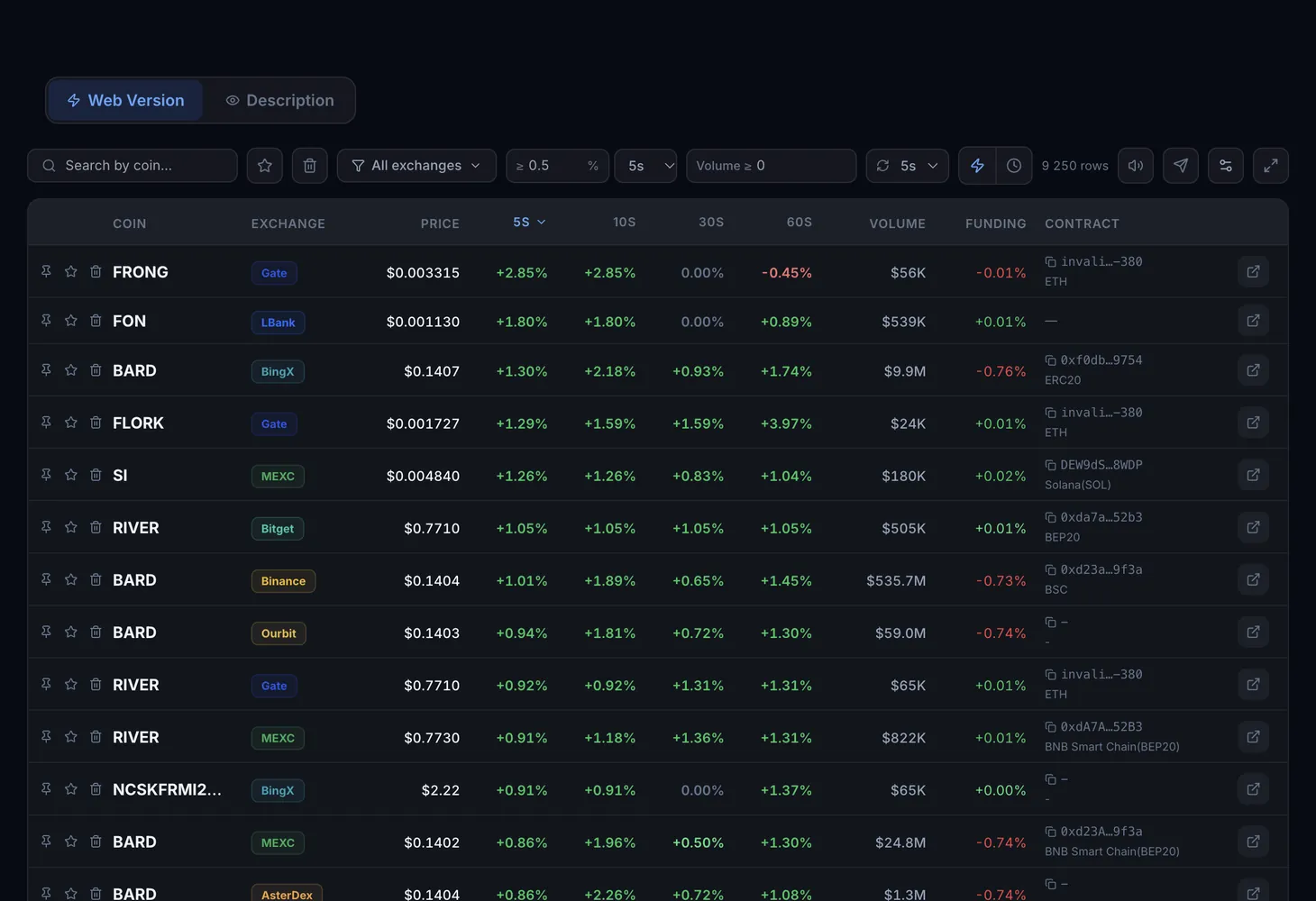
Table columns
| Column | What it shows |
|---|---|
| Coin | The coin's ticker, with pin, favorite and trash buttons next to it |
| Exchange | The centralized exchange where the move is happening |
| Price | The coin's current price on that exchange |
| 5s, 10s, 30s, 60s | Price change in percent over the last seconds (Seconds mode) |
| 5m, 15m, 30m, 1h | Price change in percent over minutes and an hour (Minutes mode) |
| Volume | Trading volume of the coin, which separates a live market from a coin that barely trades |
| Funding | The current funding rate of the futures contract |
| Contract | The token's contract address and its network |
The table covers MEXC, Gate, Bybit, KuCoin, LBank, HyperLiquid, Binance, Bitget, Ourbit, BingX, AsterDex and Lighter.
Modes, filters and buttons
- Seconds (5s–60s): short-interval columns, useful for catching a move as it starts.
- Minutes (5m–1h): longer-interval columns that show whether the impulse continues or the price is already coming back.
- Search by coin: find a coin by ticker.
- All exchanges: pick one or several exchanges. The Clear button removes the selection.
- Volume ≥: the minimum trading volume, which cuts out noise from illiquid coins.
- Favorites and Trash: show the coins you marked or hide the ones you do not need.
- Load more: add more rows to the end of the table.
Columns can be hidden and reordered in the Table settings window. It is better to keep the Actions column: without it you cannot pin, favorite or trash rows.
How to check a move
Pick a mode
Turn on Seconds to see fresh impulses or Minutes to judge whether the move holds. Set Volume ≥ to remove coins with no trading.
Compare exchanges
Find the coin with the search and look at its rows on other exchanges. If the price jumped on one exchange while the others stayed flat, the move is isolated and most likely artificial.
Check DEX
Use the address in the Contract column to open the coin's pool on a DEX. If the price did not move there, that is one more sign the impulse started on a single exchange.
Look at funding
The funding rate shows market pressure. Negative funding during a pump may point to an overbought market, positive funding during a dump to pressure from shorts.
Decide whether to enter
For an isolated pump the tool's logic is to consider a short, for an isolated dump a long. Account for fees, slippage and the risk that the move continues.
Alerts
To avoid keeping the table open, connect Telegram alerts. Each message carries the token's contract and network, funding, 24h volume and DexScreener, GMGN and exchange buttons.
Further reading
How pumps and dumps work and why the price often comes back afterwards is covered in the course: lesson 1 and lesson 2. The terms open interest and order book help when judging a move. The similar tool for decentralized exchanges is described in the DEX Dumps guide.
Questions and answers
What does CEX Pumps - Dumps show?
Abnormal price moves on centralized exchange futures markets: how much a coin's price changed over intervals from 5 seconds to 1 hour, plus volume, funding and the contract.
Why compare one coin across exchanges?
If the price jumped on only one exchange, it is most often manipulation and the price may come back. If the move is everywhere, the whole market has picked it up.
How do the Seconds and Minutes modes differ?
Seconds shows the price change over 5, 10, 30 and 60 seconds, Minutes over 5, 15 and 30 minutes and 1 hour. The first catches the start of an impulse, the second shows how it develops.
Is the tool suitable for beginners?
Yes, if you act carefully. The table and alerts give you the contract and links to check a move, but the trading decision and the risk stay with you.