How to use the Crosschain table
In short
- Each row is a token that is cheaper on one network than on another, with the spread between the two prices in percent.
- A row has two sides, buy and sell, each with its chain, price, liquidity, volume and listing age.
- The spread has to cover the bridge fee, gas on both chains and slippage with a margin, and the token must be verified on both sides.
The Crosschain table shows tokens that are priced differently on different blockchains. Each row has two sides, the network where the token is cheaper and the network where it costs more, plus the spread between them in percent. The idea of cross-chain arbitrage is simple: buy on the cheap network, bridge the token and sell on the expensive one. The table is in the web version of Crosschain.
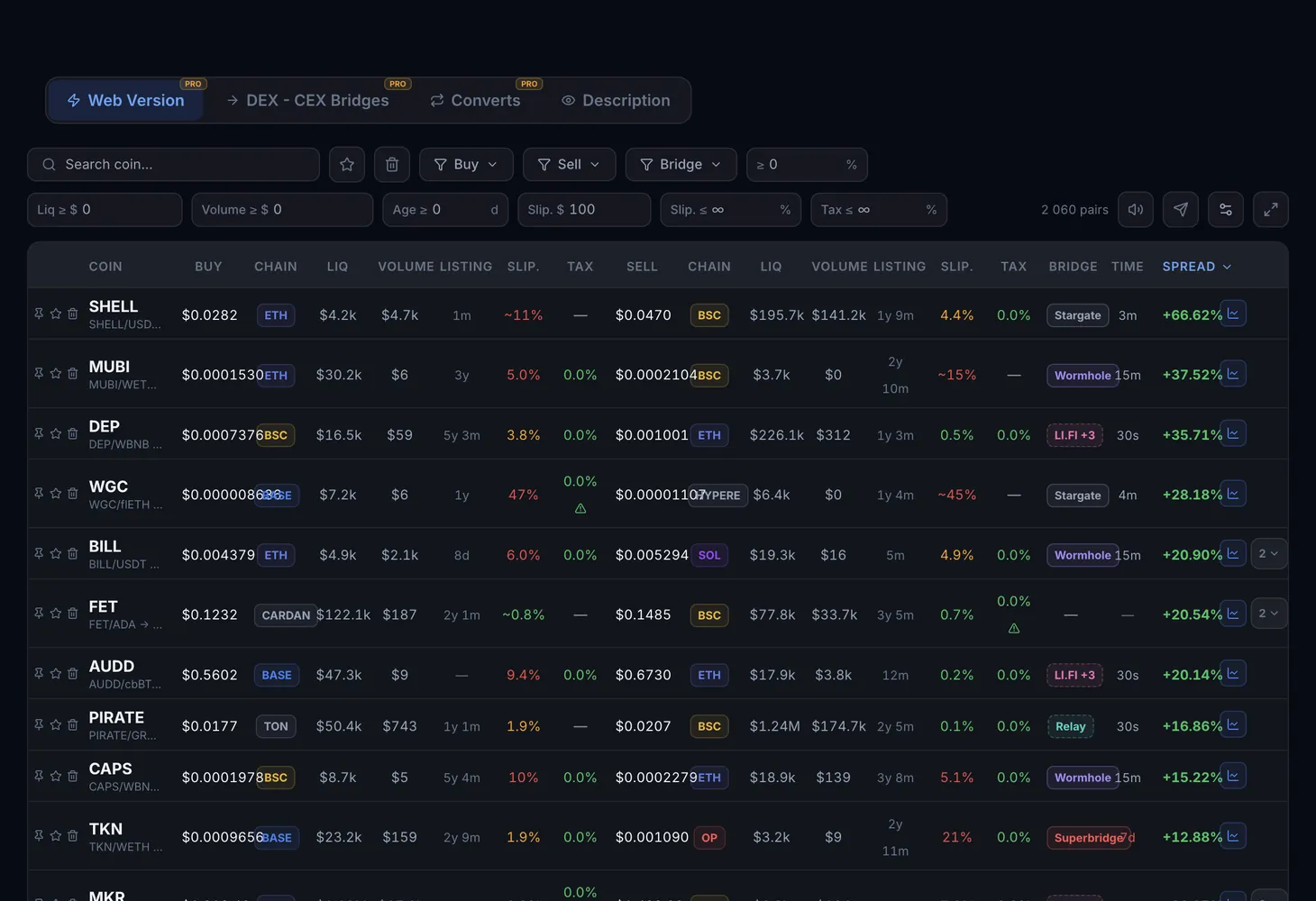
How the table is organized
| Element | What it shows |
|---|---|
| Coin | The token's ticker. Click it to expand the row and see all pairs for that ticker across every network |
| Buy | The side where the token is cheaper: chain, price, liquidity, volume and listing, meaning the pair's age |
| Sell | The side where the token is more expensive, with the same fields |
| Slippage and fee | Estimated slippage and fee for each side |
| Bridge and Time | The bridge for moving the token between networks and the transfer time. The "via aggregator" note means the route goes through an aggregator |
| Spread | The difference between the sell price and the buy price in percent |
| Links | Direct DexScreener links for each side |
| Actions | Buttons on the left of the row: pin, favorite and trash |
Some networks show Liq (OB) instead of liquidity. These are order-book chains, where depth is shown as 24-hour volume.
Pairs with at least $5K of liquidity reach the table, small spreads included. Telegram alerts are stricter: they fire only at a spread of 10% or more and liquidity from $40K. The Telegram Alerts page explains how to connect them.
Filters and buttons
- Search coin: find a token by ticker.
- Favorites and Trash: show the rows you marked or the ones you removed.
- Buy and Sell: choose networks for each side.
- Minimum spread: hide pairs with a small price gap.
- Min liquidity: the threshold applies to the lower of the two values, buy and sell.
- Min 24h volume: also taken from the lower of the two sides.
- Min listing age: in days. It helps remove brand-new pairs.
- Clear: reset the filters.
There is a full screen mode and column settings, and on a phone the table turns into cards.
The conversions table
Besides cross-chain spreads, the section has a conversions table: swaps of one coin for another at a fixed rate. It has its own columns:
| Column | What it shows |
|---|---|
| Pair | The old coin and the new coin |
| Fix rate | The rate at which the swap happens |
| Buy and Sell | Prices on each side. The "Not traded on DEX" note means the coin cannot be bought or sold on a DEX |
| D/W old and D/W new | Deposit and withdrawal status for the old and the new coin |
| Type | Convert, Deposit, Swap, Onchain or Redeem |
| Status | Live, Closed, No entry, Pending, Announced, Paused or Error |
| Deadline | The date until which the conversion is available |
The No entry status means deposits of the old coin are closed. Announced means the terms are published but the rate is not yet determined. Some coins also show a sell tax.
How to use the table
Set networks and thresholds
Choose the networks where you hold funds and set the minimum spread, liquidity, volume and listing age.
Expand the coin
Click the ticker to see all pairs for that coin across every network. It shows whether the gap is a one-off or the price differs on several networks at once.
Check both sides
Follow the DexScreener links on the buy side and on the sell side. Verify the token and see whether there is enough liquidity for your size.
Price the transfer
Account for the bridge fee, gas on both chains, DEX slippage and the transfer time from the Time column. The spread has to cover all of this with a margin.
Act or observe
If the costs are covered, you buy on the cheap network, bridge and sell on the expensive one. If not, observe: an anomalous spread may point to bridge issues, a delisting or a scam token.
To see which sections your plan includes, open the Pricing page.
The basics are in the course lesson What is DEX arbitrage and in the glossary: spread and cross-chain bridge. Gaps between DEXs and exchanges are covered in the DEX – Spot guide.
Questions and answers
What is cross-chain arbitrage?
It is a trade on the price difference of the same token across blockchains. You buy the token on the network where it is cheaper, bridge it and sell on the network where it costs more.
Why does Telegram only send spreads of 10% or more?
Cross-chain arbitrage involves bridge and gas costs, and spreads below 10% rarely cover them. The web table shows all pairs, including spreads below 10%.
Which networks are supported?
Ethereum, BSC, Base, Arbitrum, Polygon, Avalanche, Optimism, Blast, TON, Tron, Aptos, zkSync and others.
Where does such a large spread come from?
The reasons vary: different pool liquidity, differences in gas fees, overloaded bridges between networks. Not every spread is an opportunity, so verify the token and the costs first.