How to read the DEX – Futures table
In short
- Each row is a token whose DEX price differs from the futures price on an exchange, with the spread between them in percent.
- A positive spread means futures are more expensive than the DEX; a negative one means they are cheaper.
- Before trading, look at liquidity, the maximum position, slippage, token tax and the D and W statuses.
The DEX – Futures table shows tokens whose DEX price differs from the futures price on a centralized exchange. Each row gives both prices, the spread in percent, DEX liquidity, deposit and withdrawal status and the maximum position size. A positive spread means futures are more expensive than the DEX; a negative one means they are cheaper. The table is in the web version of DEX – Futures.
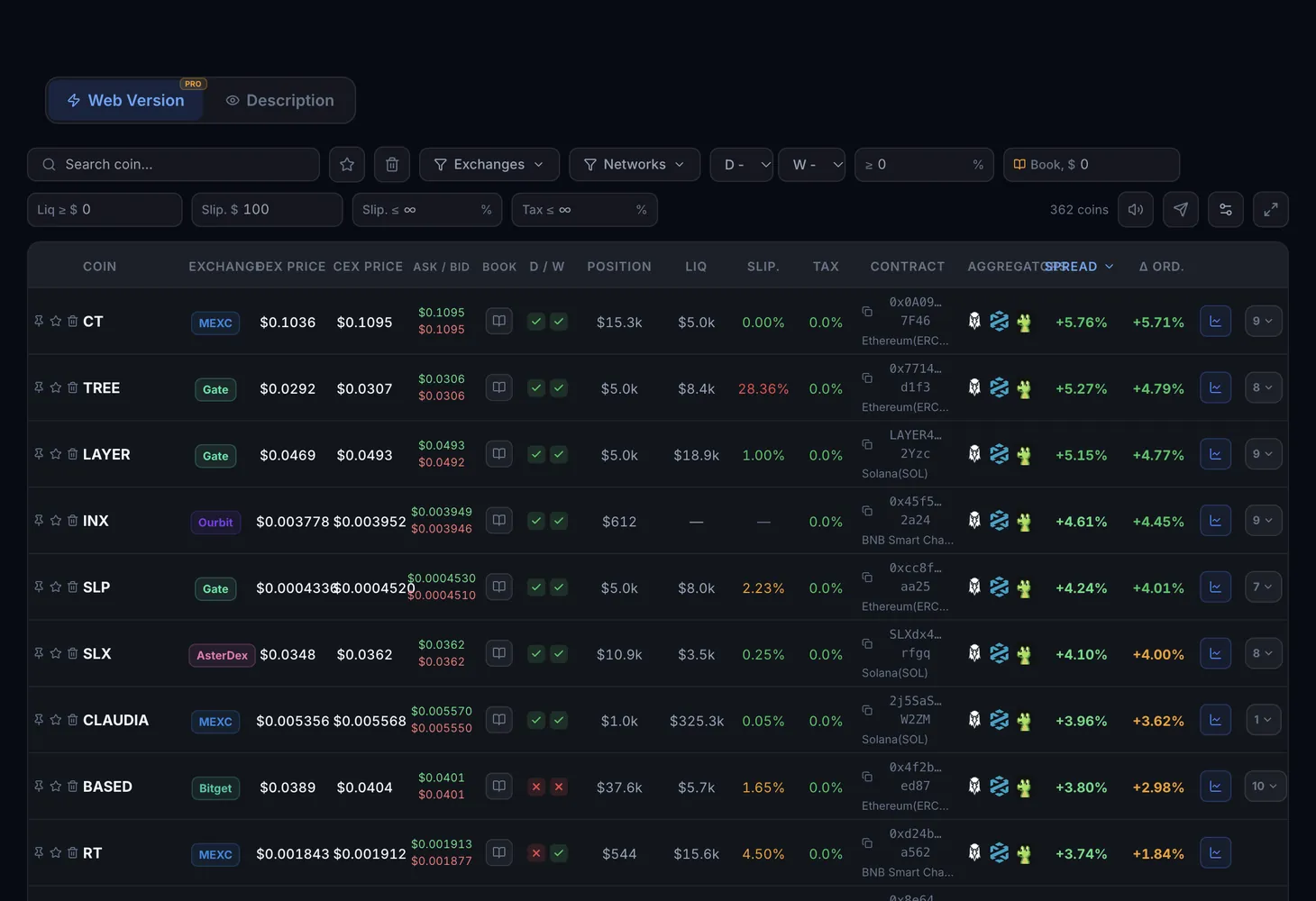
Table columns
One row is one token on one exchange.
| Column | What it shows |
|---|---|
| Coin | The token's ticker and its network |
| Exchange | The centralized exchange whose futures price is compared with the DEX |
| DEX Price | The aggregated price of the token by its contract and network: the best route across the DEXs on that blockchain |
| CEX Price | The futures price on the exchange |
| Spread | The difference between the futures price and the DEX price in percent |
| Position | The maximum position and maximum order on the exchange. Not available for every exchange |
| Liquidity | The token's liquidity in DEX pools in dollars |
| Vol 24h | Trading volume over 24 hours |
| Slippage | How far the DEX price moves for a trade of the size you set. If the pool is too shallow, the cell says "No depth" |
| Tax | The token's buy and sell tax on the DEX |
| D / W | Deposit (D) and withdrawal (W) status of the token on the exchange |
| Contract | The token's contract address |
| Links | Shortcuts to DexScreener, DexTools, GMGN and the exchange itself |
The Open chart button in the row opens the coin's chart.
Filters above the table
- Search coin: find a token by ticker.
- Favorites and Trash: show the rows you marked or the ones you removed from the table.
- Exchanges and Networks: choose the CEXs and blockchains you need.
- D/W: any status, deposit-open only, withdrawal-open only, or both at once.
- Spread %: the minimum spread.
- Liq $: the minimum DEX liquidity.
- Vol 24h $: the minimum daily volume.
- Book $: the minimum size in the exchange order book.
- Slip vol $: the trade size used for the Slippage column. When the field is empty, $100 is used.
- Slip %: the maximum DEX slippage at that trade size.
- Tax %: the maximum token tax on the DEX. An empty field turns the filter off; 0 keeps zero-tax tokens only.
- Clear: reset all filters.
You can sort the table by spread, liquidity and exchange. Sound alerts for spreads are switched on right in the browser.
Warnings in the rows
- "Honeypot — selling may be impossible!": the token looks like a trap that lets you buy but may not let you sell. It is safer to skip such rows.
- "Sources disagree — double-check before trading": data about the token from different sources does not match. Check it by hand through the links.
- "No depth": the pool does not have enough liquidity for the trade size you set in the filter.
How to use the table
Set your thresholds
Fill in Spread % and Liq $. The table keeps tokens with a visible gap and a pool that is deep enough.
Understand the direction
When futures are more expensive than the DEX, you buy the token on the DEX and open a short on the exchange at the same time. Then you wait for the prices to converge.
Check D and W
With deposits closed, you cannot move the token from the DEX to the exchange to cover the short. With withdrawals closed, you cannot move the token off the exchange. Open D and W are an important condition, though not always a strict one.
Compare liquidity and position
Liquidity shows how much you can buy on the DEX; Position shows how much you can open on the exchange. Your working size is limited by the smaller of the two.
Test your own size
Enter your trade size in Slip vol $ and look at the Slippage and Tax columns. Subtract them, the exchange fees and gas from the spread. If the numbers do not add up, just watch.
To see which sections your plan includes, open the Pricing page.
For the theory, read the course lesson What is DEX arbitrage and the glossary entries on slippage, the funding rate and honeypot tokens. A similar table for the spot market is covered in the DEX – Spot guide.
Questions and answers
Where does the DEX price come from?
The price is requested through liquidity pools on various blockchains using the token's real contract and network. It is an aggregated best-route price across all DEXs on that blockchain.
What does a positive spread mean?
Futures on the exchange cost more than the token on the DEX. With a negative spread, futures are cheaper than the DEX.
Do deposits and withdrawals have to be open?
Not always. Open D and W let you move the token between the DEX and the exchange. Without them you can only wait for prices to converge on their own, and that can take time.
What does the Position column mean?
The maximum futures position and order size on the exchange. It is shown for some exchanges and helps you see what size you can really open.