How to read the Spot – Spot table: columns, filters and checking a pair
In short
- Each row is a coin that is cheaper on one exchange than on another, with the spread between the prices in percent.
- D/W shows whether deposits and withdrawals are open, Contract shows whether it is the same token, Book and Ord. show whether there are enough orders.
- A spread is not yet a profit. Fees and slippage come out of it, and some pairs cannot be executed at all.
The Spot – Spot table lists coins that cost less on one exchange than on another. Each row shows where to buy, where to sell and the spread between the two prices. That is cross-exchange arbitrage in one line: buy cheaper, transfer the coin, sell higher. The table is on the Web Version tab of Spot – Spot.
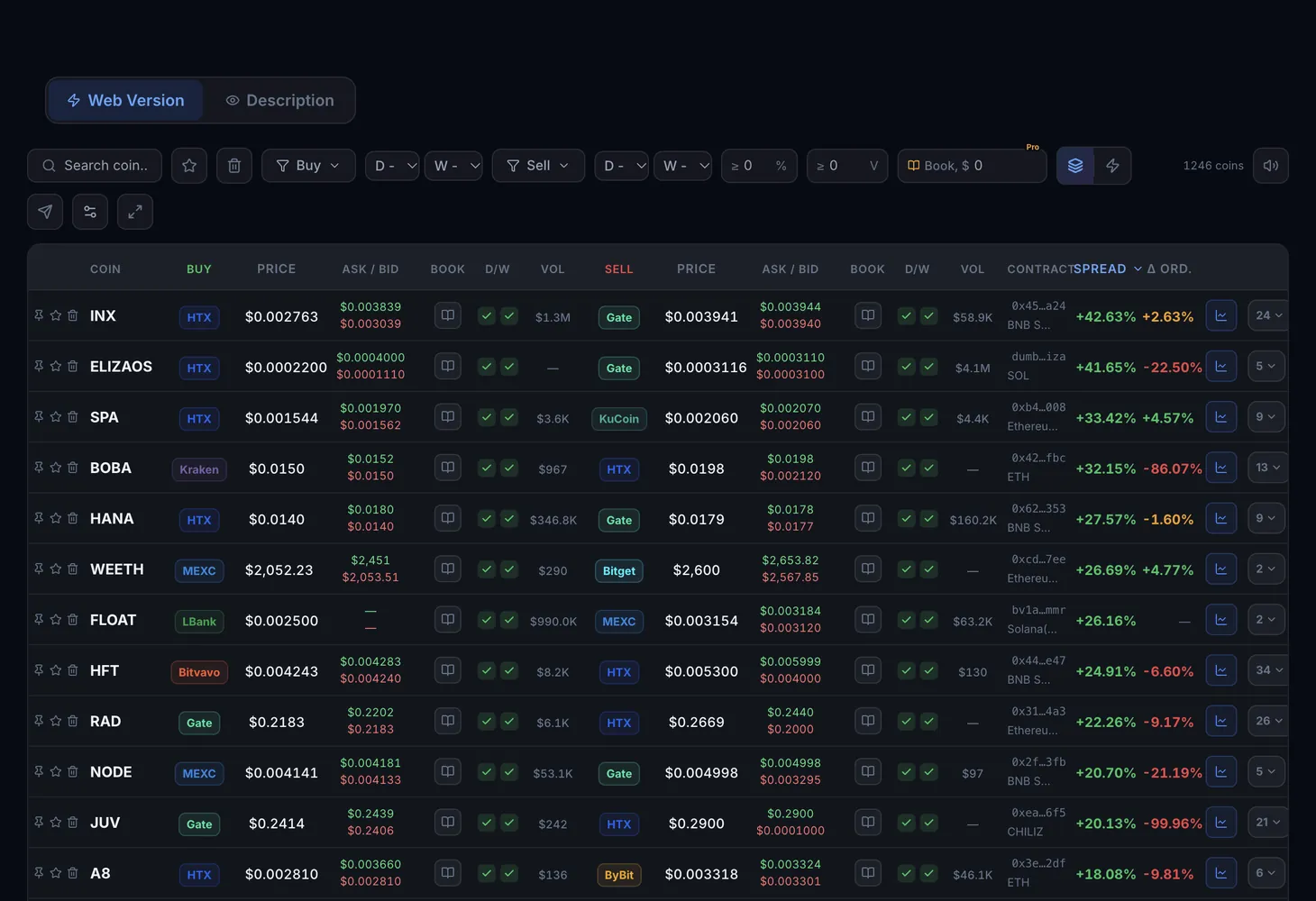
Table columns
Each row has two halves: the buying exchange on the left and the selling exchange on the right. Both sides show the same data.
| Column | What it shows |
|---|---|
| Coin | The coin's ticker, with "pin" and "favorite" buttons on its left |
| Buy | The exchange where the coin is cheaper |
| Price | The last trade price on that exchange |
| Ask / Bid | The best selling price (Ask) and the best buying price (Bid) in the order book |
| Book | How much you can buy or sell close to the price. Available on paid plans; without one it shows a lock |
| D/W | Deposit (D) and withdrawal (W) status of the coin: a check mark means open, a cross means closed |
| Vol | The coin's trading volume on that exchange in dollars |
| Sell | The exchange where the coin is more expensive, with the same columns: price, Ask / Bid, book, D/W, volume |
| Contract | The token's contract address, used to check that both exchanges trade the same coin |
| Spread | The difference between the selling and the buying price in percent |
| Ord. | The difference taking order book orders into account (Δ by orders). Available on paid plans |
The chart button at the end of the row opens the coin's chart.
Price, Ask and Bid: which one to look at
Price is the last trade, and that trade is already done. Yours will fill against orders in the order book: you buy at the Ask and sell at the Bid. So compare the Ask on the buying exchange with the Bid on the selling one. If there is almost no gap between them, the spread exists only on paper.
How Ord. differs from Spread
Spread is calculated from prices. Ord. takes the orders in the book into account, so it is closer to what a real trade of a meaningful size would get. If Ord. is far below Spread, the book is thin and the price will move as soon as you start buying or selling.
Modes, filters and buttons above the table
The All pairs and By coin modes
In All pairs mode every exchange pair is a separate row, so one coin can appear several times. In By coin mode each coin takes one row with its best pair, and the badge with a number at the end of the row expands the other options.
Filters
- Coin search: find a coin by ticker.
- Favorites: show only coins marked with a star.
- Buy and Sell: choose exchanges for each side of the trade.
- D and W on each side: show only coins with open deposits or withdrawals.
- ≥ %: the minimum spread.
- ≥ V: the minimum trading volume.
- Book, $: the minimum order book depth in dollars. This filter is available on the Pro plan.
Buttons on the right
On the right above the table you will find the number of coins in the selection, the sound and Telegram alert buttons, column settings and full screen mode.
In the Table settings window you can hide and show columns and drag them to change their order. Changes apply to the table straight away, and the reset button brings back the default view. Some columns cannot be hidden.
How to find a workable arbitrage pair
Keep only transferable coins
Turn on the W filter (open withdrawals) on the buy side and the D filter (open deposits) on the sell side. Otherwise the coin cannot be moved from one exchange to the other.
Set spread and volume thresholds
In the ≥ % field, enter a spread that covers your fees. In the ≥ V field, enter a volume that filters out coins that barely trade.
Check the contract
Compare the address in the Contract column with the coin's contract on the withdrawal and deposit pages of both exchanges. If different tokens trade under one ticker, there is no real spread.
Check the order book
Compare the Ask on the buying exchange with the Bid on the selling one, and on a paid plan also Book and Ord. There must be enough orders for your size.
Work out the result and turn on alerts
Subtract trading and withdrawal fees and slippage; the spread calculator helps with the math. To avoid watching the pair on screen, switch on sound or Telegram with the buttons above the table.
Example: how much of the spread is left
The numbers are made up and only show the order of the calculation. Say the table shows a 2% spread and the trade size is $1,000.
| Item | Example | Result |
|---|---|---|
| Price difference | 2% of $1,000 | +$20 |
| Buying fee | 0.1% | −$1 |
| Selling fee | 0.1% | −$1 |
| Withdrawal fee | flat, for example $3 | −$3 |
| Slippage on both exchanges | 0.3% | −$3 |
| What is left | about $12, or 1.2% |
Of the 2% on screen, 1.2% is left in this example, and that is before the main risk: the price can change while the coin travels between exchanges. The smaller the trade, the more a flat withdrawal fee eats into the result.
Free mode and plans
| What | Plan |
|---|---|
| The table with some of the exchanges | No plan needed |
| All exchanges | Lite and Pro plans |
| The Book and Ord. columns | Paid plans |
| The Book, $ filter | Pro plan |
Full plan details are on the Pricing page.
The theory of cross-exchange arbitrage is in the course lesson Spread, depth, volume: reading the table. The key terms are in the glossary: spread and maker and taker. And before your first transfer between exchanges, read how address poisoning works.
Questions and answers
Why is there a large spread I cannot profit from?
Most often withdrawals are closed on the buying exchange or deposits on the selling one, the order book is nearly empty, or the exchanges list different tokens under the same ticker. Check the D/W and Contract columns and compare the Ask and the Bid.
What does a cross in the D/W column mean?
Deposits (D) or withdrawals (W) of the coin on that exchange are closed right now. You cannot move the coin through that exchange until the status changes.
What is the difference between the Spread and Ord. columns?
Spread is calculated from prices, Ord. takes the orders in the book into account. The second figure is closer to what a real trade of a meaningful size would get.
Can I use the Spot – Spot table without registering?
Yes, in free mode the table shows some of the exchanges. The full list of exchanges and the extra filters come with the Lite and Pro plans.