How to use the Spot – Futures table: the spread between spot and futures
In short
- Each row is a coin whose spot and futures prices differ, with the spread between them in percent.
- A spread can be positive (futures above spot) or negative (futures below spot), and the table shows both.
- A spread is not yet a profit. Fees, funding and slippage come out of it, and the futures position can be liquidated.
The Spot – Futures table lists coins whose spot price differs from their futures price. Each row shows where to open the Long, where to open the Short, at what prices and with what spread. The classic setup is to buy the coin on spot and open a Short on futures when futures trade higher. The table is on the Web Version tab of Spot – Futures.
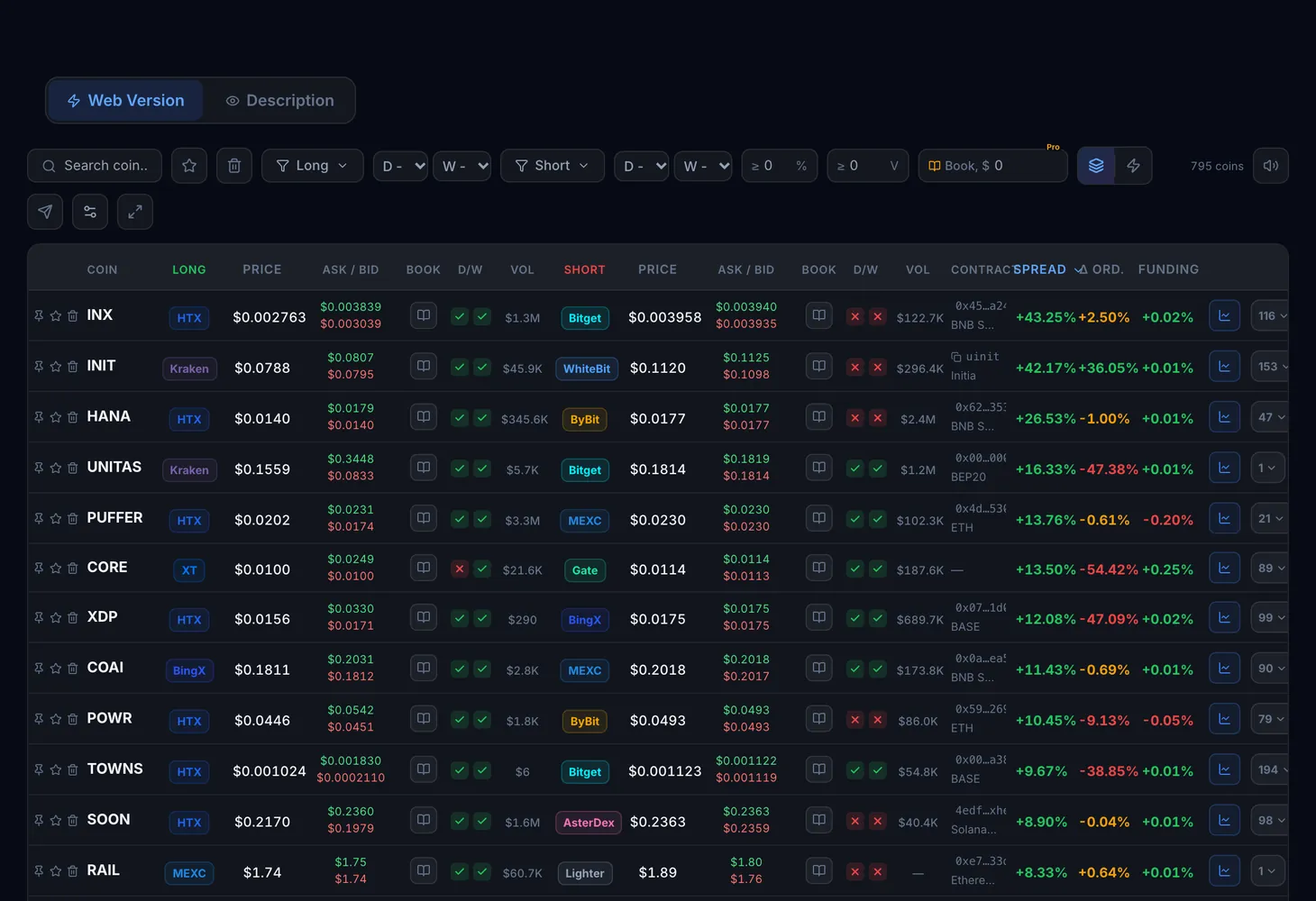
Table columns
Each row has two sides, Long and Short, and both show the same data.
| Column | What it shows |
|---|---|
| Coin | The ticker, with pin and favorite buttons next to it |
| Long — exchange, Short — exchange | Where each side of the trade is opened |
| Price | The last trade price on that side |
| Ask / Bid | The best selling and buying price in the order book |
| Buy order book, Sell order book | How many orders sit near the price on each side |
| D / W | Whether deposits (D) and withdrawals (W) of the coin are open on the exchange |
| Volume | Trading volume on that side |
| Funding | The funding rate of the futures side. Funding columns are available with the Pro plan |
| Contract and Network | The token address and network, used to check that it is the same coin |
| Spread | The difference between the spot and futures price in percent |
| Δ by orders | The difference taking order book orders into account, closer to a real trade |
The chart button in the row opens the pair in Genesis Charts.
Positive and negative spreads
The gap between the futures and the spot price is called the basis. When futures trade above spot, the spread is positive: you buy the coin on spot and open a Short on futures. When futures trade below spot, the spread is negative. That can point to a sharp sell-off, a liquidation cascade or negative funding, and the reverse setup with a futures Long applies.
Each direction carries its own risk. Funding is paid on the futures position and over time can eat into the spread or add to it.
Modes, filters and buttons
The All pairs and By coin modes
In All pairs mode every exchange pair is a separate row, so a coin can appear several times. In By coin mode each coin has one row with its best pair, and the "more" badge expands the Other spot markets and Other futures markets lists.
Filters and controls
- Search: find a coin by ticker.
- Long and Short: choose exchanges separately for each side.
- D/W Long and D/W Short: show only coins with the deposit and withdrawal status you need. The default is Any.
- Minimum spread: cut out small gaps.
- Sorting: by coin, spread, Long price and Short price.
- Pin, favorite and hide rows, plus full screen mode.
On the right above the table you will find sound alerts (separately for positive and negative spreads), Telegram alerts and the Table settings window, where you can hide columns and change their order.
How to use it
Pick a direction
Sort the table by spread. A positive spread means "spot Long, futures Short", a negative one means the reverse.
Filter the exchanges
In the Long and Short filters, keep only the exchanges where you have an account and a balance. If the coin has to be moved, require open withdrawals on the buy side and open deposits on the sell side.
Check the order book and Δ by orders
Compare the Ask on the Long side with the Bid on the Short side. If Δ by orders is far below Spread, the book is thin and the price will move as you enter.
Account for funding and fees
Subtract trading fees, slippage and the expected payments at the funding rate. The spread calculator helps with the math.
Plans
| What | Plan |
|---|---|
| The table with Binance, Bybit, MEXC, Gate and Bitget | No plan needed |
| All exchanges | Lite and Pro plans |
| Funding columns | Pro plan |
Details are on the Pricing page.
The theory is in the Futures arbitrage course section. For a pair between two futures exchanges, see the guide to the Futures Arbitrage table.
Questions and answers
How is Spot – Futures arbitrage different from Spot – Spot?
In Spot – Spot you buy a coin on one exchange and sell it on another. Here one side is spot and the other is futures, and both positions are held at the same time until the spread closes.
Do I need open deposits and withdrawals?
If both sides are on one exchange or your balances are already in place, D/W statuses matter less. To move a coin between exchanges, you need open withdrawals on the buy side and open deposits on the sell side.
What does a negative spread mean?
Futures trade below spot. This happens during panic selling, liquidation cascades or negative funding.