Supported exchanges: how to read the cards and choose exchanges for arbitrage
In short
- The page lists the exchanges integrated with Genesis Arbitrage, the ones whose data feeds the scanners.
- Each card shows a rating, Taker and Maker fees, launch year, a new-user bonus and a Visit button.
- Links on the cards are partner links. The exchange sets the bonus terms, so check them on its site.
The Supported Exchanges page is a catalog of exchanges integrated with Genesis Arbitrage. These are the venues the scanners pull prices, order books and deposit and withdrawal statuses from. The cards make it easy to compare exchange fees and go straight to sign-up where you do not have an account yet. The catalog is on the Supported Exchanges page and is open without signing in.
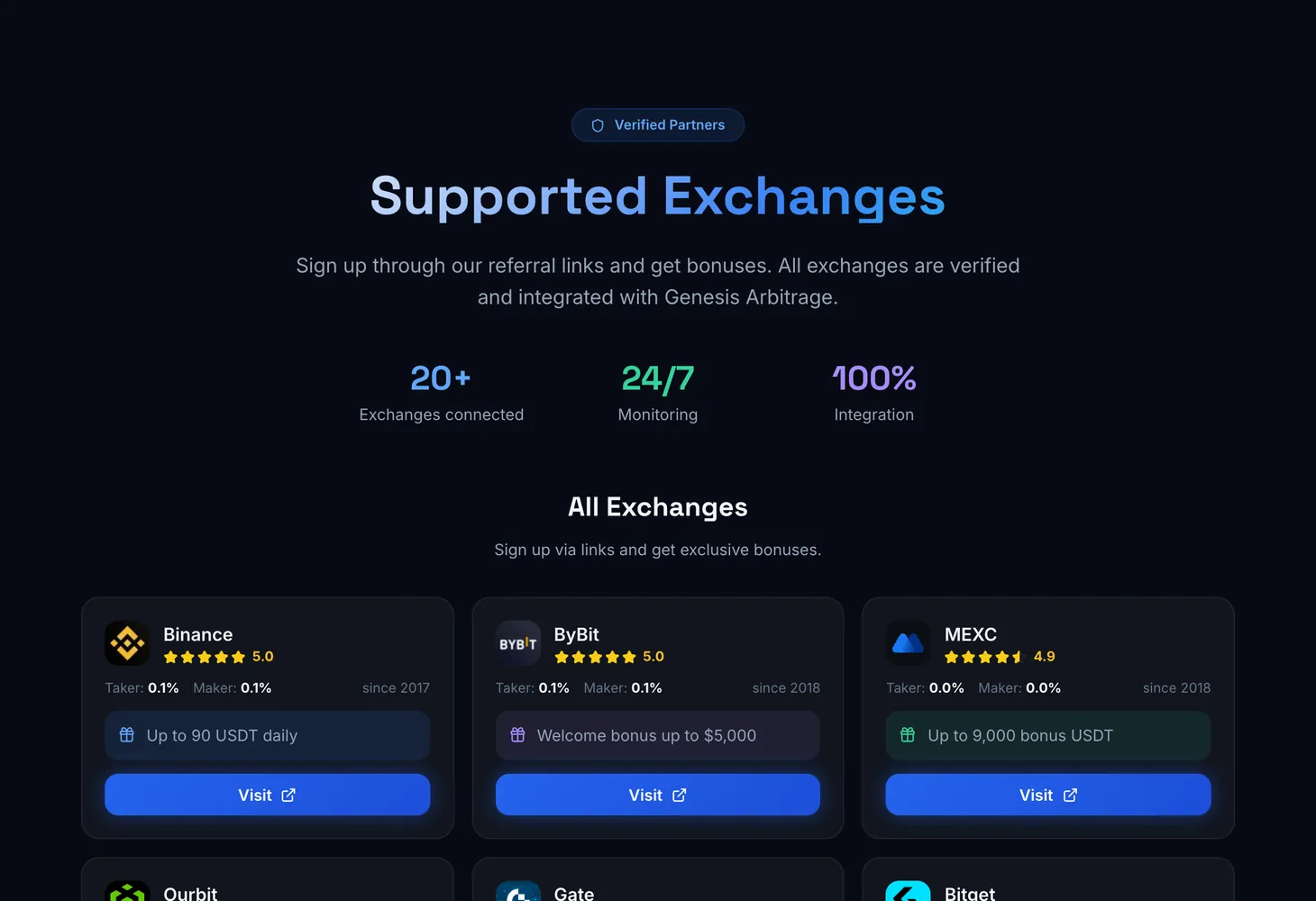
How the page is laid out
At the top are three figures: Exchanges connected, Monitoring and Integration. Below is the All Exchanges block with the cards.
| Card element | What it shows |
|---|---|
| Name and logo | The exchange |
| Rating | A star rating of the exchange |
| Bonus | The exchange's new-user offer: a fee discount, a bonus or vouchers |
| Taker and Maker | Taker and maker trading fees |
| "since" and a year | The year the exchange started operating |
| Visit | Opens the exchange's site through a partner link |
Why this matters for arbitrage
A cross-exchange trade needs accounts on at least two exchanges, and a noticeable price gap often appears on one where you have none. So it is better to open accounts on several large exchanges in advance and complete identity verification there. While you are signing up, the gap may close.
Taker and Maker fees directly affect the result. Arbitrage trades usually go through market orders, which means the taker fee. The difference is explained in the glossary entry maker and taker.
How to use it
Pick exchanges by fees
Compare Taker and Maker on the cards. The lower the fee, the smaller the spread needed to cover costs.
Open the exchange
Click Visit on the card. The exchange site opens through a partner link.
Check the bonus terms
The exchange sets the bonus and its conditions. Read them on its site before depositing.
Prepare the account in advance
Complete identity verification and turn on two-factor protection so the account is ready to trade.
Price the trade
Enter the chosen exchanges' fees into the spread calculator and look for pairs in Spot – Spot.
How cross-exchange arbitrage works and what to look for when choosing exchanges is covered in the Crypto arbitrage course.
Questions and answers
Are all scanner exchanges in the catalog?
The catalog lists the exchanges integrated with Genesis Arbitrage. The set of exchanges in a given scanner depends on the tool and the plan, as its table filters show.
Do I have to sign up through the card links?
No. The scanners work with exchange data regardless of where you have an account. The card links give access to the exchange's bonus.
Who gives the bonus?
The exchange. It sets the amount, timing and conditions, so check them on its site.
Where do the card fees come from?
They are the base Taker and Maker trading fees. Your actual fee depends on your account tier and the exchange's rules.