Prediction arbitrage: how to read the table of Direct and Cross pairs
In short
- Each row is the same question on two platforms at different prices, with the spread in cents and percent.
- Direct means buying YES on one platform and selling YES on another; Cross means buying YES on one and NO on another.
- The pair type switch offers Keywords (all users), LLM and Sport (Pro). Sport shows arbitrage betting opportunities, or surebets, by match.
- A spread is not yet a profit. Check the term to settlement, the risk tags, the platforms' rules and the order books.
The Prediction arbitrage screen lists pairs in which the same question trades on two platforms at different prices. A row shows both sides of the trade with prices and links, the spread in cents and percent, the profit after fees, the size the order books allow, the term to settlement and the risks. It helps you shortlist pairs worth checking by hand. You will find it under Prediction arbitrage.
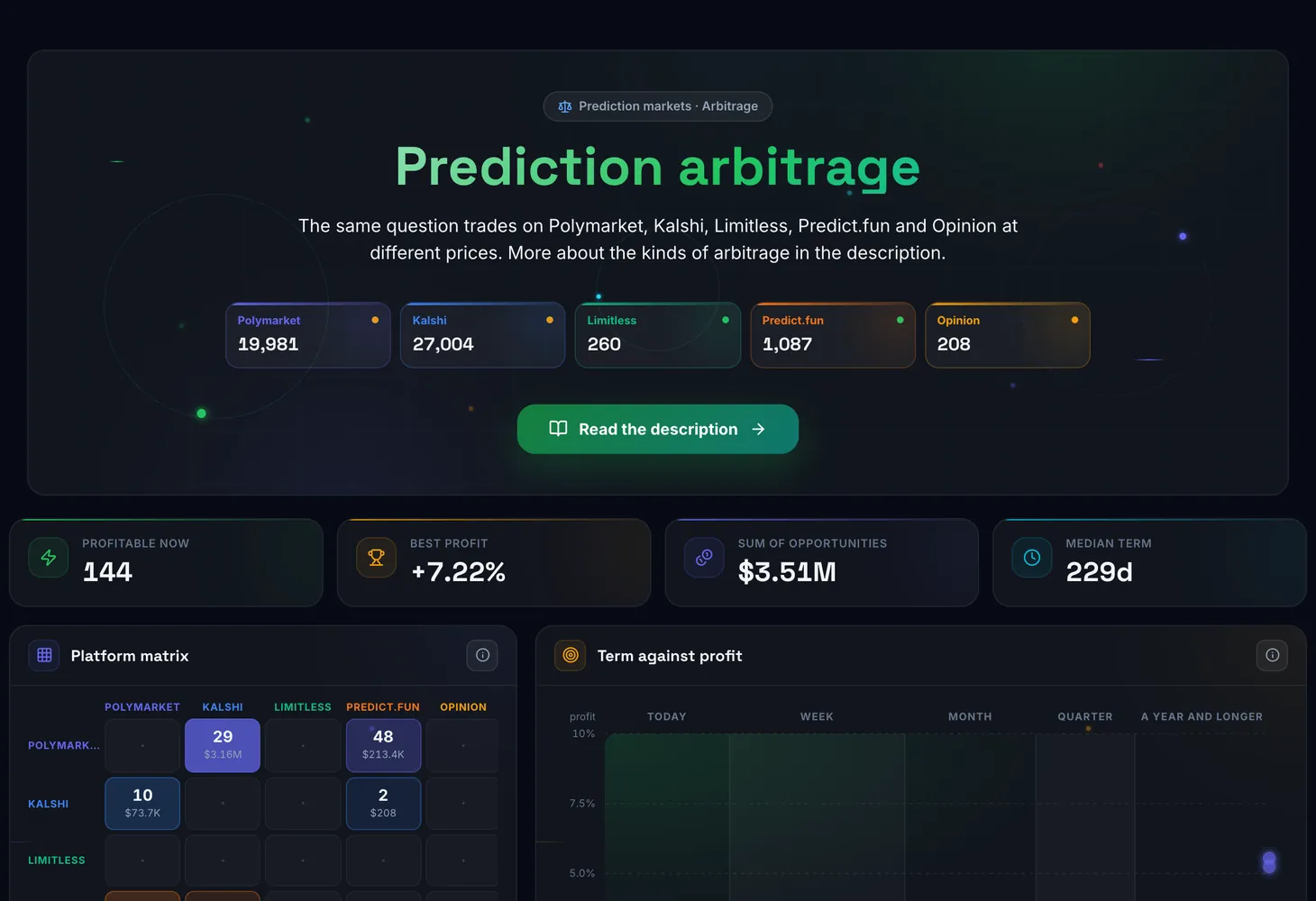
How the screen is organized
From top to bottom the screen has four parts.
| Element | What it shows |
|---|---|
| Figures at the top | Profitable now, Best profit, Sum of opportunities and Median term |
| Platform matrix | A five-by-five grid: the row is the platform where YES is bought, the column is where NO is bought. A cell holds the number of opportunities and their sum: the brighter the cell, the more money. The diagonal shows opportunities within one platform |
| Term against profit | Every dot is an opportunity. Left to right is the term to settlement by zone: today, week, month, quarter, a year and longer. Bottom to top is the profit in percent, and the dot size is the sum. The dashed line is the median profit |
| The Prediction arbitrage table | The list of pairs with prices, spread, profit, size, term and risks |
The matrix and the chart double as filters. A click on a matrix cell keeps only that platform pair in the table, and a click on a dot opens the matching row.
Direct and Cross: two ways to build a pair
The table has a Direct and Cross switch. These are two ways to trade the same price gap.
| Mode | What you do | Side columns | What to know |
|---|---|---|---|
| Direct | Buy YES on one platform and sell YES on the other | BUY and SELL | Needs less capital and gives a higher percentage, but you must already hold YES contracts on the second platform |
| Cross | Buy YES on one platform and NO on the other | BUY YES and BUY NO | Always works: one of the two contracts returns 100¢ whatever the outcome |
The spread is the same in both modes. Say YES costs 40¢ on one platform and NO costs 55¢ on another. Together that is 95¢, while the winning contract returns 100¢. In this made-up example the spread is 5¢, or a little over 5% on the 95¢ invested, before fees.
Table columns
| Column | What it shows |
|---|---|
| Market | The question the pair is matched on |
| BUY and SELL | In Direct mode: where to buy YES and where to sell YES, with the price and a link to the platform |
| BUY YES and BUY NO | In Cross mode: where to buy YES and where to buy NO, with the price and a link to the platform |
| Spread | The price difference in cents and in percent |
| Profit | The profit after platform fees |
| Size | How many shares both platforms' order books let you buy |
| Term | The number of days left until the market settles |
| Risks | The pair's risk tags, explained below |
| Created | When the opportunity appeared |
Modes, filters and buttons
- Direct and Cross: how the pair is built; the side columns depend on it.
- Keywords, LLM and Sport: the pair type switch on the right of the filter bar. Keywords (the lightning icon) shows pairs matched by name and is open to all users. LLM shows pairs confirmed by an LLM model that compares the questions. Sport shows surebets by match, covered in the section below. LLM and Sport carry a PRO badge.
- Search market: find a pair by the text of the question.
- Platforms: keep only the platforms you need.
- Amount: filter by the sum of the opportunity.
- Read the description: go to the description of the tool and the kinds of arbitrage.
If nothing fits your conditions, the table says "Nothing matches the filters". Loosen the filters.
Expanding a row: order books and size
A click on a row opens the detailed math of the trade.
- Both platforms' order books: the price levels your position would be filled at. If the data is not there yet, you will see "The order book has not arrived yet".
- The Size, shares slider and the Maximum button: set how many shares you want to buy. If there are not enough orders, a hint says the book only covers a certain number of shares.
- The math for each side: Shares, the Average and Worst price, Cost, Fee and the number of book levels.
- The total: Total to invest, Payout, Fees and Profit. In Direct mode you see Capital (YES purchase) and Sale proceeds instead.
- Settlement rules: each platform's rules and the source used to decide the outcome.
- Divergence over 7 days: how the price gap between the platforms has changed.
- Open on …: go to the market on the platform itself.
Risk tags
| Tag | What it means |
|---|---|
| Delay | This Polymarket market has an order execution delay |
| Rules | The pair is not exact: settlement rules may differ between the platforms |
| Dispute | The market's settlement is under dispute |
| Min. order | The size is below the minimum order on one of the sides |
| Thin | The opportunity is smaller than $100 |
| Stale book | A price on one of the platforms is older than 2 minutes |
| Dates | The platforms' settlement dates differ by more than a day |
| Fee estimated | The Limitless or Opinion fee is an estimate: the platform does not publish it |
| Price gap | The platforms' prices differ by 25¢ or more: almost certainly these are different questions |
| Set unverified | The set has no "other" outcome: the listed outcomes may not cover every case |
How to use it
Pick Direct or Cross
If you already hold YES contracts on the second platform, look at Direct. If not, use Cross, where both sides are purchases.
Keep your platforms
In the Platforms filter tick the ones where you have an account, or click a bright cell in the matrix.
Compare profit and term
On the Term against profit chart, big dots in the top left are opportunities with a short term and a high profit. Dots in the "a year and longer" zone lock money up for a long time.
Check the risks and the rules
Look at the tags in the Risks column. If a pair is tagged Rules, read both platforms' rules: they may settle differently.
Expand the row and set the size
Set your size with the slider, check the average price, fees and profit, then go to the platforms with the Open on … buttons. You place the trades yourself.
The Sport mode: arbitrage betting
The Sport button switches the screen to pre-match surebets, the arbitrage betting opportunities between sportsbooks and prediction markets. A row is one market of one match: result, handicap, total, both teams to score or correct score. It holds 2 or 3 bets on different platforms that together cover every outcome.
A bet tagged BET is placed at odds with one of the 10 sportsbooks; a bet tagged BUY is a YES or NO purchase on Polymarket, Kalshi or Predict.fun from its order book. The columns and risk tags are different here (Void, Outlier, Limits, Currency), and a row leaves the table once the match starts. The mode is available on the Pro plan. How to read the table is in the Sport mode guide, and how to split the amount between the bets is in the surebet calculator guide.
Plans
The LLM mode, with pairs confirmed by an LLM model, and the Sport mode, with surebets, are available on the Pro plan. Without it, the screen tells you how many more opportunities exist in these modes; in Sport a lock under the table says "N more match surebets. They are available in PRO." The Keywords mode is open to all users. See the Pricing page for what each plan includes.
For the rest of the section, read the Surebets & Predictions overview. The theory is in the course on prediction market arbitrage and the lesson on surebets with Polymarket and Kalshi, and the terms are in the glossary: spread, order book and slippage.
Questions and answers
How does Direct differ from Cross?
In Direct you buy YES on one platform and sell YES on another. In Cross you buy YES on one and NO on another. The spread is the same, but Direct needs less capital and only works if you already hold YES on the second platform. Cross always works.
Why is there a spread but only a small profit?
The spread comes from prices, while the profit is counted after fees and from the real orders in the books. The larger the size, the worse the average price. Expand the row and move the size slider to see the numbers update.
What does the Price gap tag mean?
The platforms' prices differ by 25¢ or more. Almost certainly the pair joins two different questions and there is no arbitrage. Such a pair is best skipped.
How does the Sport mode differ from Keywords and LLM?
Keywords and LLM match identical questions on prediction markets into pairs. Sport shows surebets: bets at sportsbook odds and YES/NO purchases on the different outcomes of one match. It is available on the Pro plan; the details are in the guide.
When do I get paid on a Cross trade?
After the market settles: until then the money is locked in the contracts. The Term column shows how many days are left.